 SkipSeen
Chrome & Firefox extension · YouTube
SkipSeen skips what you've watched, so autoplay lands on something new.
SkipSeen quietly remembers what you've watched and skips past it during autoplay — no more déjà vu in the Up Next queue.
Also on Firefox · History stays on your device · No account
How it works
Three steps. Then never again.
SkipSeen runs in the background. It works out of the box — install it and keep watching the way you already do. Fine-tune it later if you want.
Add it to your browser
One click from the Chrome Web Store or Firefox Add-ons. No sign-up, no setup screen.
Watch like normal
SkipSeen counts a video as watched once you've seen 30% of it — including videos YouTube already shows a red progress bar on — and keeps that list on your device.
Autoplay stays fresh
When autoplay queues a video you've already seen, it's skipped automatically. See exactly when it skips.
What's inside
Small extension, exactly enough controls.
Everything lives in one popup. No dashboards, no noise.
Automatic skipping
Already-watched videos are skipped the moment autoplay reaches them.
On/off toggle
Pause skipping any time with a single switch in the popup.
Watch stats
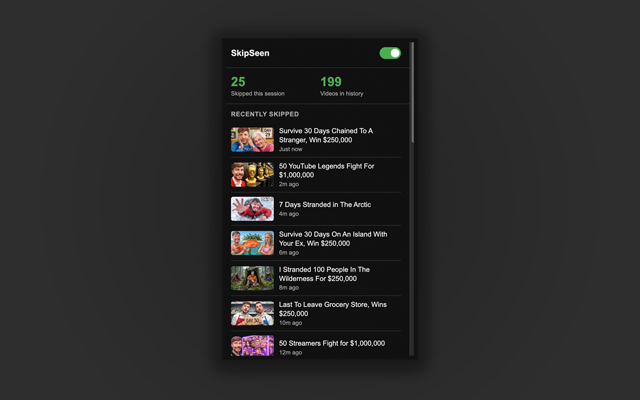
See how many videos you've skipped and how big your history is.
Skip log
Review exactly which videos were skipped in your current session.
Knows your past views
Videos with YouTube's red “watched” bar count too — no need to rewatch anything to teach it.
Your definition of watched
A video counts as watched at 30% by default. Slide it anywhere from 10% to 100%.
Playlist-aware
Playlists you chose play as-is by default. Mixes still get skipped. Switch it either way.
Never-skip channels
Add channels whose videos you're happy to rewatch. They're never auto-skipped.
Private by design
Your history is stored locally and never sent anywhere. Clear it any time for a clean slate.
Your watch history never leaves your device.
The extension has no servers, no analytics, and no account. Everything it remembers is stored in your browser's local storage and is never uploaded. Uninstall it, or hit “Clear history,” and it's gone. The privacy policy lists exactly what it keeps.
uploads
FAQ
Questions about autoplay replaying videos you've seen
The questions people ask most about autoplay replaying old videos — and how SkipSeen fixes it.
Why does YouTube keep autoplaying videos I've already watched?
YouTube picks the next autoplay video mainly from the one you're watching, and it has no setting that excludes videos you've already seen, so repeats keep turning up. SkipSeen fixes this by remembering what you've watched and automatically skipping those videos during autoplay. Read why it happens and what YouTube's own settings do.
How do I make YouTube autoplay skip videos I've already watched?
Install the free SkipSeen extension for Chrome or Firefox. It runs in the background, counts a video as watched once you've seen 30% of it (adjustable), and automatically skips any already-watched video the moment autoplay reaches it — no setup required.
Does SkipSeen work with YouTube autoplay and the Up Next queue?
Yes. SkipSeen watches the autoplay / Up Next flow on youtube.com and steps past any video that's already in your watched history, so autoplay moves on to something new. If five watched videos come up in a row, it lets the sixth play rather than skipping forever.
Which browsers does SkipSeen work in?
SkipSeen works on youtube.com in desktop Chrome and Firefox, and in Chromium browsers such as Edge and Brave that install from the Chrome Web Store. It doesn't work in the YouTube mobile or TV apps, since those don't support browser extensions.
Is SkipSeen free and private?
Yes. SkipSeen is completely free and works entirely on your device. Your watch history is stored in your browser's local storage and is never uploaded. The extension itself has no servers, no analytics and no account; this website uses analytics to count visitors, as the privacy policy explains.
How is SkipSeen different from extensions that hide watched videos?
Hide-watched extensions remove or dim watched videos in your feeds so you can pick something new yourself. SkipSeen doesn't hide anything; it keeps autoplay on and skips watched videos when autoplay reaches them. The two work well together. See how SkipSeen compares with other tools.
Stop rewatching.
Start with something new.
+ Add SkipSeen to ChromeUsing Firefox? Get SkipSeen for Firefox